Oman E-Invoicing ERP Integration: Data, Mapping and Testing
Last updated at
November 4, 2026
Book a Demo
Learn more about this by booking a demo call with us. Our team will guide you through the process and answer any questions you may have.
Book NowConnecting Your ERP to Oman E-Invoicing: What to Prepare
Introduction
From your Fawtara go-live date, your ERP's normal invoice will not be valid for tax in Oman unless it is an e-invoice. An e-invoice counts only if it follows the Oman specifications and is validated by an accredited service provider. Oman e-invoicing ERP integration is how your existing system meets that requirement without being replaced. This guide shows what to prepare: the connection model, deadlines, invoice data, PINT Oman invoice mapping, validation, invoice exchange and testing.
How Oman E-Invoicing ERP Integration Works
Oman e-invoicing uses a 5-corner model. Your business is corner 1, your buyer is corner 4, the two accredited service providers are corners 2 and 3, and the Oman Tax Authority (OTA) is corner 5. According to the OTA's Fawtara FAQs, the service providers validate and exchange e-invoices between taxpayers and report specific tax data to the OTA.
In Oman e-invoicing ERP integration, your ERP connects to your own service provider, which handles the exchange with the buyer's provider and the reporting to the OTA. The format matters as much as the route: XML is the mandatory structured format, and the OTA states that a PDF invoice is not an e-invoice.
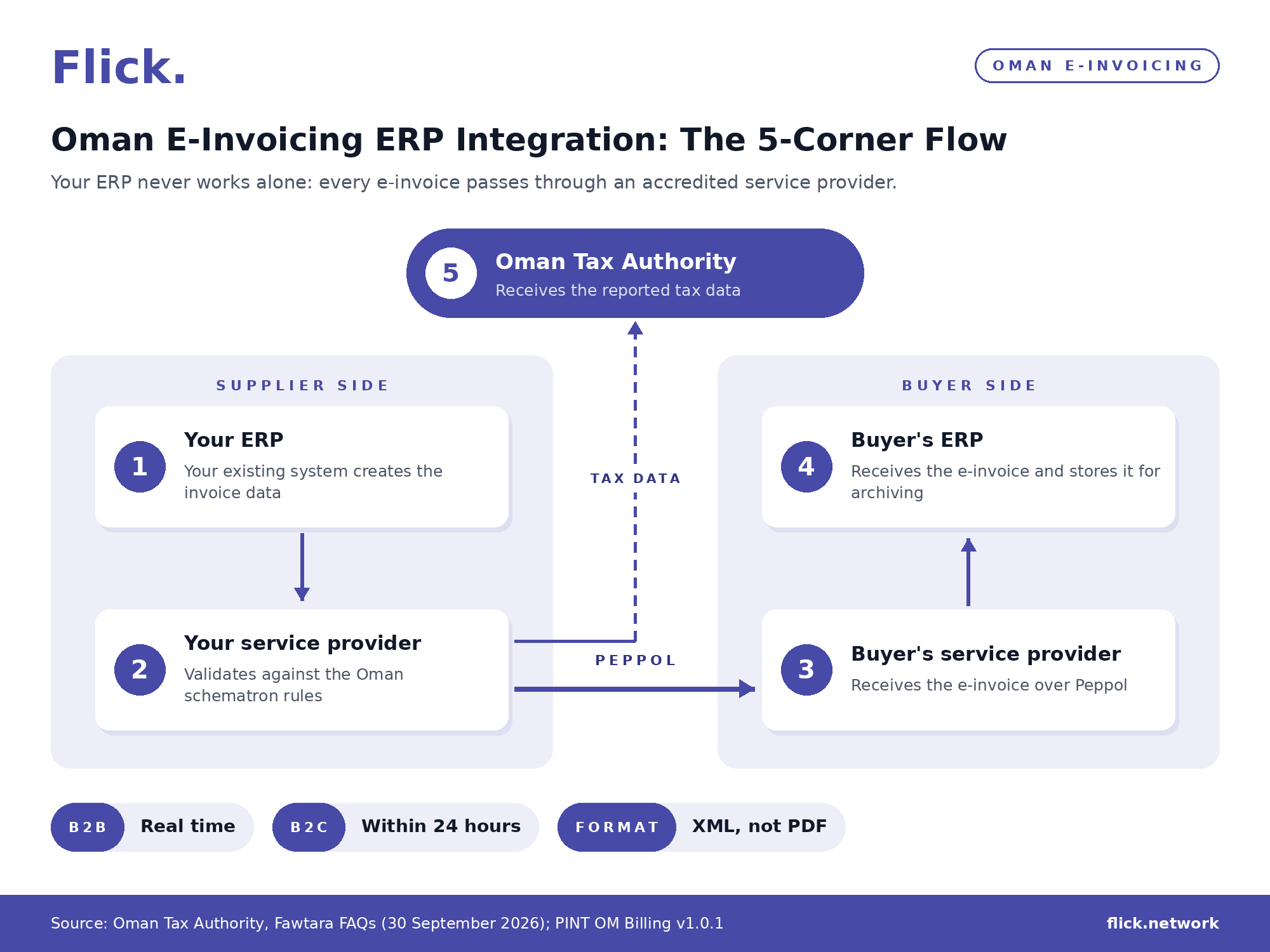
How an invoice from your ERP travels through the Fawtara 5-corner model in Oman.
Can You Keep Your Existing ERP for Oman E-Invoicing?
Yes. The OTA confirms that ERP systems can be retained, based on the arrangement your business has with its accredited service provider. E-invoices can be issued through any compliant e-invoicing solution, so Oman e-invoicing ERP integration is about connecting your system rather than replacing it.
Peppol, the network accredited service providers use to exchange e-invoices, is a network and specification framework rather than software. The OTA confirms that organisations may integrate their existing ERP or billing systems with a Peppol Access Point, provided the documents conform to the Peppol specifications.
How Fawtara ERP Integration Links You to a Service Provider
You request a connection with an accredited service provider through the Fawtara Portal, which also lists the providers the OTA has accredited. Your business can be connected to one service provider at a time. You can disconnect and switch providers, and a provider can start a disconnection, but it takes effect only with your approval.
The technical side of Fawtara ERP integration is not standardised. Each provider defines its own linking and integration process based on its system and service model, so ask how your ERP will connect before you choose. Providers must also use the OTA's centralised Service Metadata Publisher (SMP), the directory that publishes where each participant receives documents, and cannot run their own.
A business that meets the OTA's service provider criteria and passes the prescribed tests can also be accredited and act as its own service provider.
When Should Your Oman E-Invoicing ERP Integration Be Ready?
Your Oman e-invoicing ERP integration should be complete on or before your go-live date. The OTA expects taxpayers to onboard with their selected service provider by that date, in line with the timeline set by Decision No. 189/2026, which amends the Executive Regulation of the VAT Law.
Your go-live date depends on the value of your annual supplies. Check two figures against OMR 5,000,000: your supplies from 1 April 2026 to 31 March 2027, and the supplies you expect from 1 April 2027 to 31 March 2028. If either figure is above OMR 5,000,000, your date is 1 April 2027. If neither is, your date is 1 October 2027.
The calculation includes taxable supplies (excluding capital assets), goods and services subject to the reverse charge mechanism, and intra-GCC supplies. Non-resident taxpayers count only supplies made in Oman, and VAT groups apply the threshold at group level.
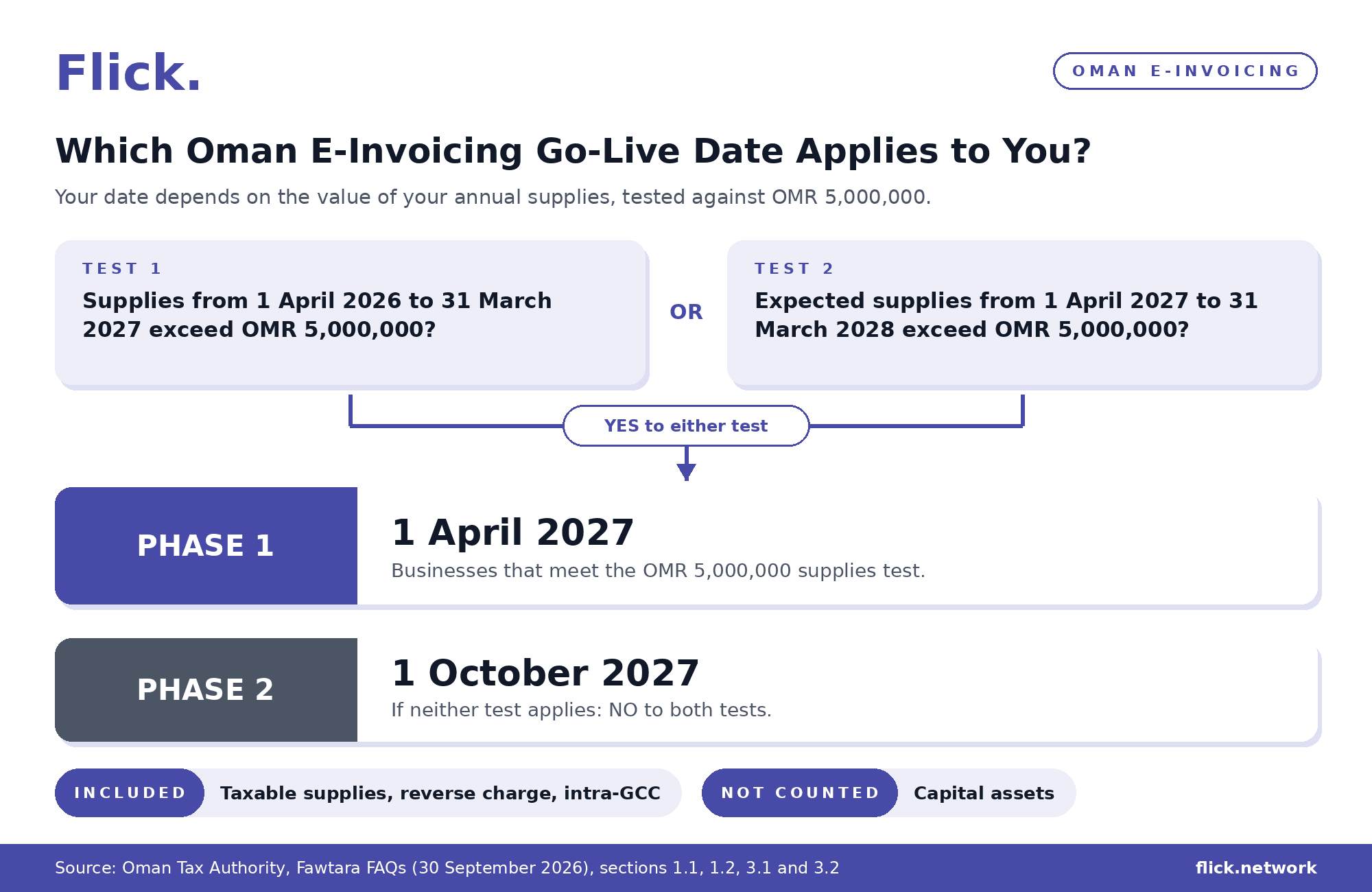
How your annual supplies decide your Oman e-invoicing go-live date.
The stages in the Oman e-invoicing timeline are:
| Stage | Date | Who it covers |
| Pilot | Before your go-live date | Businesses are encouraged to join the pilot and to start testing and issuing e-invoices early |
| Phase 1 | 1 April 2027 | Businesses that meet the OMR 5,000,000 annual supplies test |
| Phase 2 | 1 October 2027 | All other VAT-registered businesses |
What Invoice Data Your ERP Needs for Oman E-Invoicing
Beyond the details on a normal tax invoice, Oman e-invoicing ERP integration needs your ERP to supply Oman-specific data, starting with the transaction type. The PINT Oman billing specification treats the transaction type (BTOM-001) as the primary driver for validation. It decides which business terms are mandatory, which combinations are allowed and which VAT treatment applies. BTOM terms are business terms added specifically for Oman.
The core data your ERP should hold for each e-invoice is:
| Data | What your ERP should hold | PINT OM reference |
| Document type | Tax invoice (380), credit note (381), self-billed invoice (389) or self-billed credit note (261) | Section 1.5.1 |
| Transaction type | A 20-character code of 1s and 0s; position 1 (full tax invoice) or position 2 (simplified invoice) must be 1, and other positions mark subtypes such as export or prepayment | BTOM-001 |
| Invoice UUID | A version 5 UUID, a name-based unique identifier for each document | BTOM-002 |
| Buyer identification | Buyer ID or buyer VAT ID for full, export, summary, e-commerce and profit margin invoices; buyer VAT ID for self-billed, import, reverse charge and profit margin self-invoices | Section 1.6.6 |
| VAT category per line | S (standard rated, 5%), Z (zero rated), E (exempt) or O (outside scope) | Section 1.6.5 |
| Item classification, where used | A code with its scheme, such as 12-digit Oman HS codes for goods or 8-digit UNGM codes for services | Section 3.1.14 |
| Preceding document reference | The original invoice ID, issue date and UUID when a credit note refers to an earlier invoice | Section 1.6.8 |
Conditional Invoice Data by Transaction Type in Oman
Some transaction types make extra data mandatory, and some combinations are not allowed at all. PINT Oman rejects, for example, a self-billed invoice marked as an export, or an export marked as an import reverse charge.
Here are the extra data fields your ERP must supply for each transaction type:
| Transaction type | Extra data required |
| Export | Delivery country and export evidence |
| Export zero-rated as a re-export | Reference and UUID of the original self-billed import invoice |
| Summary invoice | Invoice period, within the same calendar month |
| Continuous supply | Invoice period |
| Third party | Agent party name, VAT ID, address and country |
| Import of goods | Import date, customs declaration number and Incoterms |
| Prepayment | Prepaid amount and reference invoice |
| Special zone | Subdivision code, plus a licence ID where the subdivision code is not MO |
PINT Oman Invoice Mapping for Your ERP
The OTA does not issue separate mapping guidance. Its FAQs state that taxpayers and service providers must use the PINT Oman specifications as guidelines for mapping their ERP system against the requirements. PINT Oman invoice mapping is the core of Oman e-invoicing ERP integration: it links each ERP field to a business term and to its location in the UBL XML, the structure the e-invoice file follows.
Invoices and credit notes under the PINT OM Billing specification carry the specification identifier "urn:peppol:pint:billing-1@om-1" and the business process identifier "urn:peppol:bis:billing". Self-billed documents, including imports, follow the separate PINT OM Self-Billing specification, so map them against that document.
The following sample covers common ERP fields rather than the complete field list:
| ERP field | PINT OM business term | UBL element |
| Invoice number | IBT-001 | cbc:ID |
| Invoice UUID | BTOM-002 | cbc:UUID |
| Invoice currency | IBT-005 | cbc:DocumentCurrencyCode |
| Tax accounting currency | IBT-006 | cbc:TaxCurrencyCode |
| Seller VAT registration number | IBT-031 | cac:AccountingSupplierParty/cac:Party/cac:PartyTaxScheme/cbc:CompanyID |
| Buyer electronic address | IBT-049 | cac:AccountingCustomerParty/cac:Party/cbc:EndpointID |
| Item classification code | IBT-158 | cac:CommodityClassification/cbc:ItemClassificationCode |
| Import date | BTOM-020 | cac:Shipment/cac:Delivery/cbc:ActualDeliveryDate |
| Customs declaration number | BTOM-021 | cac:Shipment/cbc:ID |
| Incoterms | BTOM-022 | cac:DeliveryTerms/cbc:ID |
Amount and Currency Rules in PINT Oman Invoice Mapping
Check these amount and currency rules when you map your ERP values:
Decimals: line-level amounts can carry up to three decimals (Baisa precision, where 0.001 OMR equals 1 Baisa), while document-level totals such as total VAT and the total with VAT allow a maximum of two.
No negative values: monetary values cannot be negative, so a reversal uses a credit note document type rather than negative amounts. Use the credit note (381) for ordinary invoices and the self-billed credit note (261) for self-billed invoices.
OMR invoices: an invoice in OMR must not carry a tax accounting currency or an exchange rate.
Foreign currency invoices: an invoice in another currency must use OMR as the tax accounting currency, include the exchange rate (BTOM-003) with up to 7 decimal places, and show VAT in both currencies.
Legacy references: a credit note that refers to an invoice issued before mandatory e-invoicing, with no valid UUID, uses the dummy UUID 00000000-0000-0000-0000-000000000000.
How Oman E-Invoicing Validates Invoices From Your ERP
Your service provider checks every e-invoice your ERP sends against the Oman schematron rules, the automated checks published with the PINT Oman specification. Responsibility for invoice compliance stays with your business, while the OTA monitors service provider performance. The checks cover the transaction type, VAT, currency consistency, business scenarios and structure. They do not check commercial correctness or tax decisions beyond the defined rules.
Retailers using tax-inclusive prices need to plan for one specific case in their Oman e-invoicing ERP integration. Working backwards from a rounded retail price can create a difference of one Baisa (0.001 OMR) per invoice line, so PINT Oman applies a tolerance to two VAT amount fields only: the line VAT amount (BTOM-016) and the VAT category tax amount (IBT-117). The limit is ±0.001 OMR for each line VAT amount, and ±(0.001 × number of invoice lines) OMR for the VAT category tax amount, evaluated at two decimals. The category-level tolerance first permits a 0.01 OMR difference at 10 invoice lines. Configure your ERP validation with both limits, as the line-level and category-level tolerances differ.
Here are the three outcomes of the two tolerance checks:
| Result | What happens |
| Accepted | The reported VAT amount equals the calculated amount exactly |
| Accepted with warning | The difference is within tolerance; a warning is raised, but the e-invoice is not rejected |
| Rejected | The difference exceeds the tolerance, and the e-invoice fails validation |
Sending and Receiving E-Invoices Through Your ERP in Oman
The route an e-invoice takes in Oman depends on who is part of the rollout. B2C is implemented at the same time as B2B and B2G, so your Oman e-invoicing ERP integration needs to handle all three from your go-live date.
The flow for each scenario is:
| Scenario | Flow | What it means for your ERP |
| B2B, both parties in the rollout | C1 → C2 → C3 → C4, with tax data to C5 | Submitted in real time |
| B2C | Submitted within 24 hours | Your business generates the QR code, which is required on the human-readable invoice for all B2C transactions and where the buyer is not VAT registered |
| Buyer not yet in the rollout | Your service provider submits the Tax Data Document to the OTA | The invoice reaches the buyer through your current process and format |
| Export | C1 → C2 → C5 | The invoice is shared with the overseas customer as per current practice |
| Imports | Reported as self-billed invoices | Use the PINT OM Self-Billing specification |
| Supplier not yet in the rollout | Current process and format | Applies to purchase invoices you receive from that supplier |
What Is the Oman Tax Data Document?
The Oman Tax Data Document (TDD) is a regulatory report submitted to the OTA for tax reporting. It is not exchanged between the invoice issuer and the receiver, and either party may submit one, depending on the reporting obligation. Where your buyer is outside the rollout, your service provider submits the TDD to the OTA once you send it the invoice.
Receiving Purchase Invoices into Your ERP
Purchase e-invoices reach your ERP through your own accredited service provider, which acts as corner 3 when your business is the buyer. Peppol does not store documents, and the OTA will not provide invoice-related information to taxpayers or service providers. Storing and archiving the e-invoices you receive under the VAT legislation is therefore your responsibility, so plan storage as part of your Oman e-invoicing ERP integration before go-live.
Testing Your Oman E-Invoicing ERP Integration Before Go-Live
Service providers are expected to pass the mandatory Peppol tests, the eDelivery Test Suite and the PINT OM Test Suite, on the official Peppol Testbed before accreditation. Those tests cover the provider's system, not the data your ERP sends. The steps below are recommended preparation for testing your own Oman e-invoicing ERP integration rather than legal requirements.
Here are the steps to follow with your service provider:
Compare your ERP's invoice fields with the PINT OM business terms and list any gaps before your Oman e-invoicing ERP integration starts.
Choose an accredited service provider and request the link through the Fawtara Portal.
Test a sample of every document type you issue, including credit notes and, where relevant, self-billed documents.
Test every transaction type you use, such as exports, prepayments, summary invoices and imports.
Test invoices with mixed VAT categories and invoices in a foreign currency.
Send invoices with known errors and confirm your team can see each rejection, correct the data and resubmit.
Receive a test purchase invoice into your ERP and confirm where it is stored for archiving.
Check that B2C invoices print the QR code on the human-readable invoice and meet the 24-hour submission window.
How Flick Network Helps with Oman E-Invoicing ERP Integration
Flick Network supports Oman e-invoicing ERP integration in these ways:
Accredited service provider in Oman: Flick Network is an OTA-accredited service provider, operating in Oman as Advanced Information Technology Company LLC.
In-house ERP integration: Flick's integration team connects your existing ERP to Fawtara, so the system you already use stays in place.
Validation before exchange: Flick validates each invoice against the Oman schematron rules before it is exchanged with your buyer's provider.
Peppol exchange and tax reporting: Flick is a certified Peppol Access Point, exchanges e-invoices over Peppol and reports tax data to the OTA.
Security and experience: Flick holds ISO/IEC 27001:2022 certification and has over 6 years of global e-invoicing experience, with 350+ million e-invoices generated annually.
Conclusion
Oman e-invoicing ERP integration rewards early preparation. Businesses that start well before their go-live date have time to resolve gaps with their service provider, which means fewer corrections and less disruption to finance operations once invoices are issued live. To discuss your ERP integration and Flick's Oman e-invoicing solution, contact sales@flick.network.
Frequently Asked Questions
1. Does the Oman Tax Authority Charge Fees for E-Invoicing?
No. The Oman Tax Authority (OTA) does not charge any fees for e-invoicing. Pricing is set by each accredited service provider and may include subscription fees, transaction-based fees or other arrangements. Request a quotation from your chosen provider before you connect.
2. Can an Oman E-Invoice Be Adjusted After It Is Issued?
Yes. After an e-invoice is issued, it is adjusted by issuing an electronic credit note or debit note. Your ERP should therefore be able to produce both document types.
3. Do Historical Invoices Need to Be Uploaded to Fawtara?
No. The OTA does not require historical invoices to be submitted as part of e-invoicing. Credit notes that refer to an invoice issued before e-invoicing follow a separate rule, covered in the PINT Oman invoice mapping section.
4. Can Oman E-Invoices Be Issued in More Than One Language?
Yes. Invoices can be issued in different languages, provided they are issued as per the Oman VAT legislation. The e-invoice itself must still follow the Oman specifications and the mandatory XML format.
5. Who Provides Technical Support During Fawtara ERP Integration?
Your service provider is the first point of contact. The OTA asks businesses that integrate through a provider to send technical support questions to that provider. Questions about using the Fawtara Portal can be sent to ticketing@taxoman.gov.om.
6. Can Invoices Be Issued Manually and Entered Electronically Later?
No. The OTA considers only invoices issued as per the Oman e-invoicing specifications to be valid. A manual invoice, or a PDF, does not meet this requirement, so each invoice should be issued as an e-invoice from the start.
7. Are There Industry Exceptions to Oman E-Invoicing?
No. There are no industry exceptions. Every taxpayer must comply with the e-invoicing requirements according to their respective rollout phase, which depends on the value of annual supplies.
8. Can a Business Use Any Peppol Access Point for Oman E-Invoicing?
No. Taxpayers can connect only with a Peppol Access Point, or service provider, accredited by the OTA. The Fawtara Portal lists the accredited providers, and a business can be connected to one provider at a time.
Quick Navigation
Book a Demo
Learn more by booking a demo with our team. We'll guide you step by step.