Oman E-Invoicing for Overseas Customers: Export Rules
Last updated at
October 9, 2026
Book a Demo
Learn more about this by booking a demo call with us. Our team will guide you through the process and answer any questions you may have.
Book NowInvoicing Overseas Customers: Oman E-Invoicing Rules for Exports
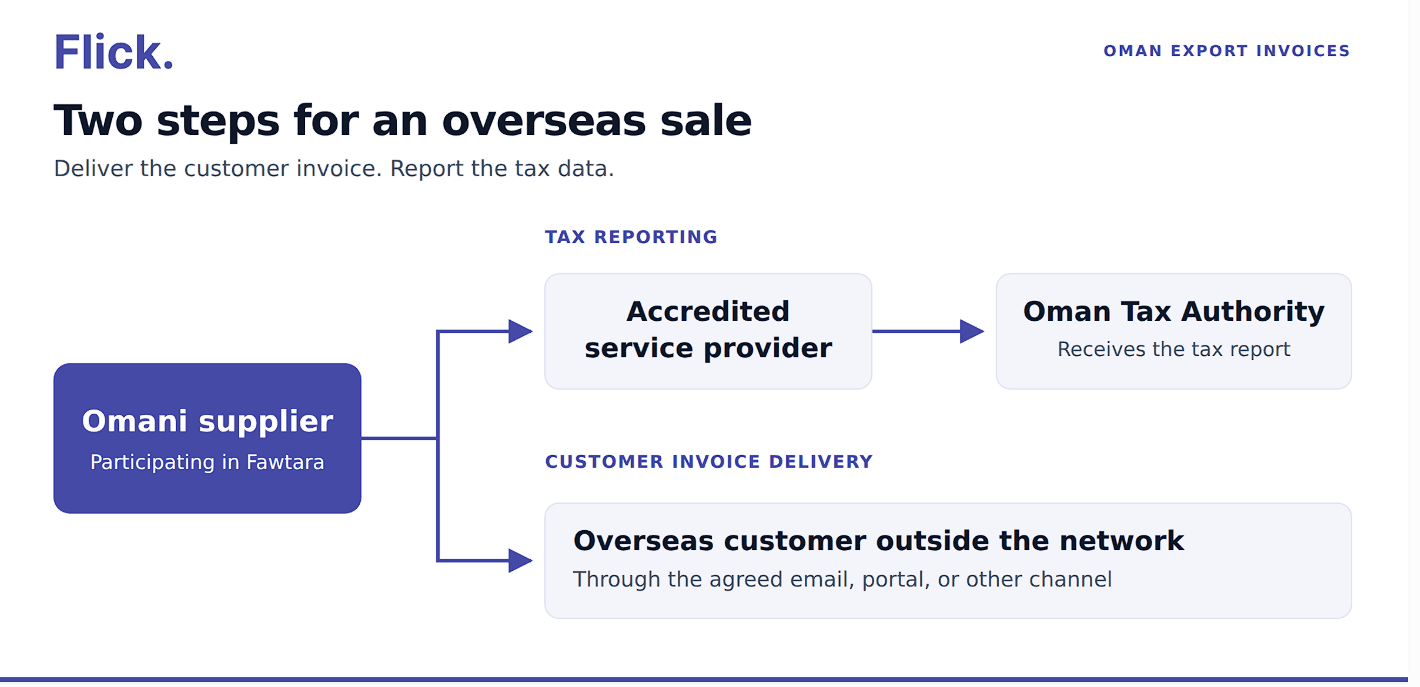
An overseas customer may receive your invoice by email or through a customer portal. Once your business is required to use Oman’s Fawtara system, you also need to handle the tax reporting for that transaction. Sending the customer an invoice and reporting the sale are separate steps.
For an Omani supplier, this raises some practical questions. What should you enter when the buyer has no Oman VAT number? Which export details belong in the invoice? Does a foreign billing address justify charging 0% VAT? And what records should you keep after the goods leave Oman?
The answers affect how your finance team prepares the invoice, how your billing system handles it, and how you support the tax treatment later.
This guide explains it all for an Omani supplier participating in Fawtara and selling to an overseas customer outside the Oman e-invoicing network. It explains the reporting process, the information to prepare, and the checks to make before walking through an illustrative export sale.
How Oman E-Invoicing Works When Your Customer Is Overseas
The Oman Tax Authority’s Fawtara FAQs on export invoicing explain that the supplier shares the invoice with the export customer using its existing practice. Tax reporting goes through the supplier’s service provider to the authority.
In the official model, this is described as C1 → C2 → C5: the supplier, its accredited service provider, and the Oman Tax Authority. This export process addresses a customer and customer service provider outside the network.
Your finance team should therefore be able to answer two separate questions about an export invoice: has the customer received it, and has the tax reporting been completed?
The Oman Tax Data Document specification describes the document used for regulatory reporting. The Tax Data Document, or TDD, serves a different purpose from the invoice sent to the customer.
For day-to-day work, keep the invoice reference connected to both activities. A customer email confirms delivery to the buyer; check the reporting status separately in your e-invoicing system.
What to Include in an Oman Export E-Invoice
Start with the information your finance team needs to bill the customer correctly. Then check how those details are transferred into the required electronic fields.
The Oman invoice specification sets out the document structure and validation requirements. The following table highlights information to prepare and check for an export transaction. It is a working guide, rather than a complete technical field list.
| Information | What to prepare or check |
| Invoice details | Invoice number, issue date, currency, and applicable supply or payment details. |
| Supplier details | The Omani supplier’s legal name, address, VAT identification, and other required identifiers. |
| Overseas customer details | The buyer’s legal name, address, country, and an appropriate buyer identifier or VAT identifier. |
| Export classification | The applicable export classification and tax treatment for the transaction. |
| Goods or services | Clear descriptions, quantities where applicable, prices, discounts, and charges. |
| Delivery country | The destination country required for an export invoice. |
| Invoice totals | Line amounts, tax amounts, and the final amount payable, with consistent calculations. |
| Conditional export information | Additional fields that apply to the particular transaction, such as qualifying service exports or re-exports. |
A common difficulty is the overseas customer’s identifier. Under Oman’s buyer identification rule, an export invoice must contain either a buyer identifier or a buyer VAT identifier. A customer without an Oman VAT number still needs to be identified appropriately.
Ask your service provider which identifier and identification scheme fit the customer’s circumstances. Avoid filling the field with your own VAT number or a made-up value simply to get past a validation error.
The export delivery-country rule also makes the delivery country mandatory. Check the actual destination rather than automatically copying the customer’s billing country.
Before testing, ask someone in finance to review a few real customer records. Missing identifiers and delivery details are easier to resolve before they hold up an invoice.
Does an Overseas Sale Qualify for 0% VAT?
A foreign customer’s address alone does not establish the VAT treatment. Check what you are supplying and whether the transaction meets the relevant conditions. OTA’s VAT guidance on imports and exports explains the conditions for zero-rating exports. Zero-rated supplies also differ from exempt supplies, as explained in the authority’s VAT FAQs.
Exports of Goods
OTA’s guide sets conditions that include goods leaving the relevant territory within 90 days of the supply and retaining official and commercial export evidence. Restrictions also apply to goods being used or altered before export.
The arrangements matter as an export organised by the supplier and one organised by the customer need to be assessed under the applicable conditions.
Understand who will receive the customs and shipping documents before the goods leave. This is particularly useful when the customer controls transport, and your finance team must request the evidence afterwards.
Exports of Services
Services require a separate assessment. Customer residence, where the services are used or enjoyed, and special place-of-supply rules can affect eligibility.
For example, work billed to a UK company may involve activities or beneficiaries in Oman. Finance should understand the work performed and where its benefit is received before selecting the tax treatment.
Keep that decision with the transaction records. A short explanation supported by the contract is more useful during a later review than a tax code with no explanation.
Example: Invoicing a UK Customer Outside the Fawtara Network
Consider an Omani supplier selling equipment to a UK business. The supplier participates in Fawtara, arranges shipment from Oman to the UK, and has confirmed that the sale meets the conditions for zero-rating.
The equipment costs OMR 2,000. For simplicity, this example has no discounts, separate delivery charges, or foreign-currency conversion. The customer receives invoices through its purchasing portal and is outside the Oman e-invoicing network.
The finance team first checks the purchase order against the customer record. It confirms the buyer’s legal name, billing address, agreed identifier, and UK delivery destination. It also checks the description and quantity of the equipment against the order.
Next, the team prepares the invoice in its billing system. The invoice records the OMR 2,000 sale, the applicable export classification, and the selected zero-rating treatment. VAT is OMR 0, and the amount payable is OMR 2,000.
Before using this transaction as a test case, the supplier should agree the expected result with its service provider. That includes how the buyer identifier, delivery country, and export tax treatment appear in the electronic invoice.
The invoice then follows the supplier’s configured validation and reporting process. Separately, the finance team delivers the customer’s invoice through the purchasing portal.
For internal tracking, it is useful to record the customer-delivery status alongside the reporting status. If the portal upload fails, the team can follow up with the buyer. If reporting needs attention, it can investigate with the service provider using the same invoice reference.
When the equipment ships, the supplier adds the customs and transport evidence to the transaction file. The order, invoice, shipment records, and tax-treatment decision should be easy to find together.
This example illustrates the working process. A transaction involving customer-arranged transport, services, re-exported goods, or delivery to a different country needs its own review.
Records to Keep and Checks Before Sending
Prepare the export file as the transaction progresses. Waiting until a tax review to collect documents can make it harder to explain what happened or obtain missing evidence.
For goods, the supporting file may include customs documentation, transport documents, the sales contract, and the invoice. For services, keep records that explain the work, customer, and basis for the VAT treatment.
Some export transactions also have specific electronic-data requirements. The qualifying service-export rule requires a service-type field when its specified export and zero-rating conditions apply. For the specified re-export treatment, the invoice must reference the original self-billed import invoice and include its document UUID. These requirements apply to the relevant transaction types.
Use the following as an internal review checklist:
- Customer details: Confirm the legal name, country, and appropriate buyer identifier.
- Delivery details: Check the destination against the order and shipment arrangements.
- Tax treatment: Record why the selected rate and category apply.
- Invoice data: Check descriptions, amounts, totals, and any conditional export fields.
- Customer delivery: Confirm the agreed email address, portal, or other delivery channel.
- Reporting: Check the status through the service provider and follow up on errors.
- Supporting records: Keep the invoice and relevant evidence connected by a consistent reference.
Assign responsibility for each follow-up. For example, logistics may collect transport evidence while finance checks the invoice and tax treatment. A named owner makes missing documents easier to resolve.
Flick Network provides e-invoicing and integration tools for businesses working with existing billing systems. Its Oman e-invoicing solution describes ERP integration, invoice validation, and automated tax reporting to OTA. These capabilities can support the process from invoice preparation through reporting.
When discussing your setup, bring representative export transactions. Include a customer without an Oman VAT number and any service exports or re-exports your business handles. Testing those cases helps reveal the information your team needs to collect.
Frequently Asked Questions
Does an Overseas Customer Need to Join Fawtara to Receive My Invoice?
OTA describes an export process for a customer outside the network. The supplier shares the invoice through its existing customer-delivery practice and handles tax reporting through its service provider.
Is Sending a PDF Enough?
A PDF may serve the customer’s agreed delivery process, but OTA states that a PDF is not an e-invoice. Your Fawtara process must also meet the prescribed electronic requirements.
Does Charging 0% VAT Remove the Reporting Requirement?
The export reporting process still applies to the transaction. A zero VAT amount does not make customer delivery and tax reporting the same task.
What If the Customer Has No Oman VAT Number?
Confirm an appropriate buyer identifier with your service provider. The export invoice rules allow either a buyer identifier or a buyer VAT identifier; do not invent an Oman VAT number.
Quick Navigation
Book a Demo
Learn more by booking a demo with our team. We'll guide you step by step.