Oman E-Invoicing Validation Errors: Checks & Fixes
Last updated at
October 22, 2026
Book a Demo
Learn more about this by booking a demo call with us. Our team will guide you through the process and answer any questions you may have.
Book NowOman E-Invoicing Validation Errors: What to Check Before Submission
Oman e-invoicing validation errors occur when a structured invoice fails a required format or business-rule check. Whether it be missing fields, inconsistent totals, incorrect currency information, invalid identifiers, or incompatible transaction classifications, all cause problems.
A PDF can look complete while its electronic data is wrong. Read the validation message, identify the affected field, and compare what your ERP holds with what the integration actually sends.
This guide follows published PINT OM Billing v1.0.1 rules. The examples illustrate the checks, but they are not records of actual Fawtara rejections.
What Is Being Validated?
When investigating Oman e invoicing validation errors, establish which document is being checked. Oman publishes separate specifications for billing, self-billing and the Tax Data Document, or TDD. The TDD reports tax information to OTA; it is separate from the invoice exchanged with the customer.
The Oman Tax Authority’s Fawtara FAQs state that service providers validate invoices against Oman’s Schematron rules. These are automated checks applied to the structured document. The taxpayer remains responsible for compliance.
Check both the electronic data and the actual transaction. Automated validation can identify missing fields or inconsistent calculations, but finance must still confirm the supply’s VAT treatment and supporting records.
Oman E Invoicing Validation Errors: Issue and Correction Table
The table groups problems covered by published rules. It does not rank their frequency, and your provider’s messages may use different wording.
| Issue | What to check | Correction |
| Missing required fields | Invoice or address data is absent from the structured document. | Complete the source record or repair the XML mapping. A value printed only on the PDF does not fill the electronic field. |
| Invalid identifiers | A VATIN, invoice UUID or identification scheme fails its applicable rule. | Verify the genuine identifier and format. Correct UUID generation in the integration. |
| Totals do not reconcile | Lines, discounts, charges, VAT and totals disagree. | Recalculate from the source amounts and correct missing or duplicated components. |
| Incorrect VAT category or rate | The category, rate, amount or reason code is inconsistent. | Confirm the supply’s VAT treatment, then correct the associated fields together. |
| Incomplete currency information | Required OMR tax information is missing or conversion values disagree. | Check the currencies, exchange rate and required OMR VAT fields. |
| Incompatible transaction flags | Full and simplified types are both selected, or additional classifications conflict. | Confirm the transaction and remove incompatible flags. |
| Missing scenario-specific data | Export, summary or continuous-supply classification activates further requirements. | Add the applicable delivery-country or invoice-period data. |
| Incorrect date or number format | A date is invalid or future-dated, or a value exceeds its field’s precision limit. | Correct the source date or formatting logic and regenerate the document. |
Check Missing Fields in the Electronic Invoice
Oman e invoicing validation errors can arise even when the required information exists in your ERP. Check whether it reaches the correct electronic field.
Baseline requirements include an invoice number, issue date, document type, currency, seller name and buyer name. Oman also requires an invoice issue time and additional local information.
Check Address Components Separately
PINT Oman validation rules require specified seller address components, including address lines 1, 2 and 3, city and postal code. Required buyer components depend on the transaction classification; full tax and export invoices are among the scenarios covered.
For example, an ERP may store the customer’s complete address in one text box. The PDF prints it correctly, but the integration exports only the first address line.
If the record is incomplete, obtain the correct information. If the data exists but is absent from the XML, repair the mapping. Avoid meaningless filler entered solely to satisfy a required field.
Check Scenario-Specific Information
An export invoice requires a delivery-country code. Summary and continuous-supply invoices require an invoice period. A summary invoice’s start and end dates must fall within the same calendar month.
A summary period from 28 October to 3 November therefore needs review. Prepare documents with periods that meet the applicable rule and reflect the actual billing arrangement. Flick’s guide to invoicing overseas customers explains export information, customer delivery and tax reporting.
Validate Identifiers Against the Correct Field
For Oman e invoicing validation errors involving identifiers, capture the precise field and rule reference. A VATIN, buyer identifier and invoice UUID serve different purposes.
IBR-003-OM specifies OM followed by exactly 10 digits for the VATIN fields it covers. Verify the registration record as well as the transmitted format; a correctly formatted number can still belong to the wrong business.
Under IBR-016-OM, specified classifications, including full tax and export invoices, require either a buyer identifier or buyer VATIN. Where a buyer identifier is permitted, use its appropriate scheme and genuine value.
Do not assign your own VATIN or an invented number to an overseas customer. Confirm the appropriate identification method with your provider.
Keep the Invoice Number and UUID Separate
The invoice UUID is a technical identifier separate from the commercial invoice number. The published v1.0.1 rule requires the invoice UUID to be version 5.
If validation points to the UUID, ask the integration team to check its generation method and ruleset version. Entering a UUID-shaped string in the invoice-number field will not correct it.
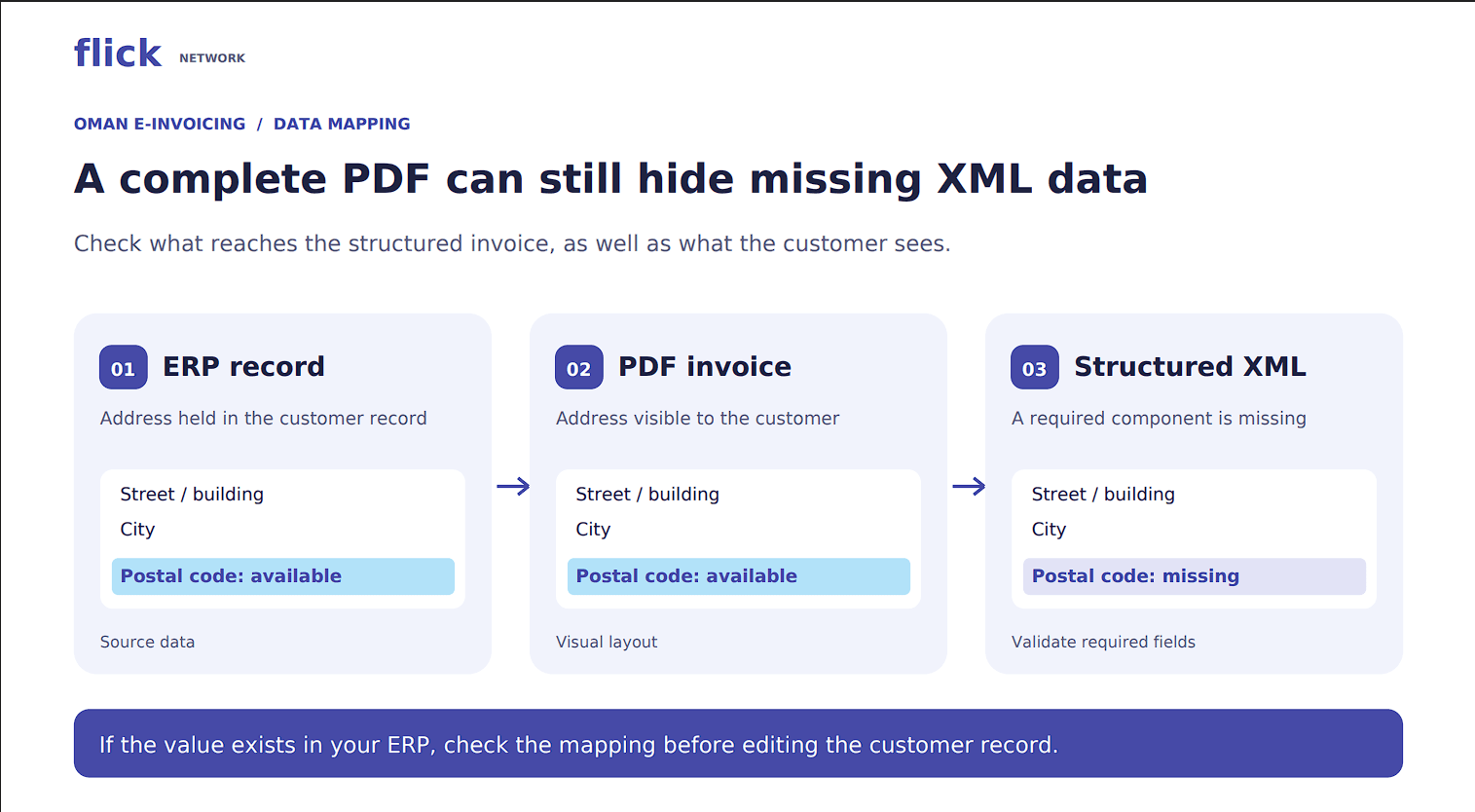
A complete-looking PDF does not confirm that every required electronic field has been populated.
Resolve Oman E Invoicing Validation Errors in Totals
Start with the line calculations before changing a document total. The line-net calculation accounts for quantity, item net price, price base quantity, line charges and line allowances. A price quoted per pack or multiple units needs the corresponding price base quantity.
At document level, reconcile:
- Net total: Sum of line net amounts, minus document-level allowances, plus document-level charges.
- VAT total: Sum of the applicable VAT-category tax amounts.
- Total including VAT: Net total plus VAT total.
Check the customer’s amount due against recorded payments and genuine payment-rounding adjustments too. This is an accounting check; do not assume every reconciliation has a dedicated fatal validation rule.
Example: A Discount Missing from the Net Total
Assume a standard-rated invoice contains OMR 1,000.00 in line net amounts, a document-level discount of OMR 50.00, and no charges or prepayments.
The net total is OMR 950.00. VAT at 5% is OMR 47.50, giving a total including VAT of OMR 997.50.
If the XML includes the discount but reports a net total of OMR 1,000.00, correct the total-generation logic and associated VAT calculations.
Also check where the discount was applied. If it already reduced the line net amounts, subtracting it again at document level would double-count it.
Check Decimal Precision by Field
Oman e invoicing validation errors can also involve transmitted decimal precision. One baisa equals OMR 0.001, but every amount field does not necessarily accept three decimals.
The Oman precision rule allows up to three decimals for amounts within its defined scope. Separate restrictions apply to document-level fields; published rounding guidance uses two decimals for document-level VAT amounts.
Inspect the electronic value and its destination rule. A single ERP setting that formats every OMR amount identically may need adjustment.
Make the VAT Category, Rate And Reason Agree
When resolving Oman e invoicing validation errors involving VAT, confirm the supply’s tax treatment before changing its code. Zero-rated and exempt supplies both produce no VAT, but require different electronic information.
Standard-rated lines use category S with a rate of 5. Zero-rated lines use Z with a rate of 0. Exempt lines use E and must omit the invoice-item VAT-rate field.
An exempt line with a rate of 0 is therefore different from one with the rate omitted, and can fail the exempt-line rule.
VAT breakdowns with category E or Z require the applicable reason code. Use the relevant Oman code list. Check discounts and charges as well, because they carry their own VAT information.
Currency Checks for Oman E Invoicing Validation Errors
For a foreign-currency invoice, the published model requires OMR as the tax accounting currency, an exchange rate, and VAT information in both currencies. An invoice issued in OMR must omit the separate tax accounting currency and exchange rate.
Check four connected elements:
- Direction: The rate converts the invoice currency into OMR.
- Precision: The rate has no more than seven decimal places.
- Conversion: OMR VAT agrees with invoice-currency VAT multiplied by the rate, under the applicable check.
- Category information: A foreign-currency invoice containing standard-rated VAT also needs the specified accounting-currency tax amount, category code and rate.
Example: USD VAT Is Present, but OMR VAT Is Missing
Assume a domestic standard-rated sale has a net value of USD 2,000.00 and VAT of USD 100.00. Using an illustrative rate of 1 USD = 0.3845 OMR, converted VAT is OMR 38.45.
The document needs the USD invoice currency, OMR tax accounting currency, exchange rate, converted VAT total and required standard-rated accounting-currency category information.
The customer’s total remains USD 2,100.00. OMR tax reporting does not create a second payment amount.
Flick’s foreign-currency invoice guide explains the applicable rate source, date and rounding checks. The rate above is an example, not a rate for a real transaction.
Check currency labels alongside values: relabelling USD 100.00 as OMR without converting it would leave the amount wrong.
Check Transaction Classifications Before Adding Data
Oman e invoicing validation errors can originate in an incorrect transaction flag that activates irrelevant field requirements.
PINT Oman’s transaction type is a 20-character bitmap using 1 and 0 for active and inactive classifications. It must identify either a full tax invoice or a simplified invoice, never both.
Additional compatibility rules prohibit combinations such as:
- Self-billed with third-party.
- Self-billed with export.
- Summary with continuous supply.
Confirm the transaction with finance before changing the flags. If the classification is correct, supply its required data. Switching to simplified merely to bypass missing fields would leave the underlying classification unresolved.
How to Investigate Oman E Invoicing Validation Errors
Use the following process to resolve Fawtara invoice data errors and keep a record of the correction.
1. Keep the Failed Document and Report
Capture the invoice reference, rule identifier, field location, severity and validator’s specification version. Keep the structured document that produced the result; a screenshot saying “submission failed” may omit essential details.
2. Find the Source of the Problem
Compare the ERP record with the transmitted value. Finance can correct customer records and confirm VAT treatment. The integration team can repair mapping, formatting or UUID generation. Your provider can help interpret the rule.
3. Correct and Regenerate
Make the correction where the document is generated. Editing one exported file leaves the next invoice exposed to the same problem.
When several invoices fail the same rule, check their shared template, customer configuration or transaction setup.
4. Revalidate and Check the Next Status
Review the corrected document’s full validation result. If it has already been issued, delivered or reported, confirm the appropriate correction process before retransmission.
Check customer delivery and TDD reporting separately from validation. Flick’s Oman Peppol 5-corner model guide explains these stages.
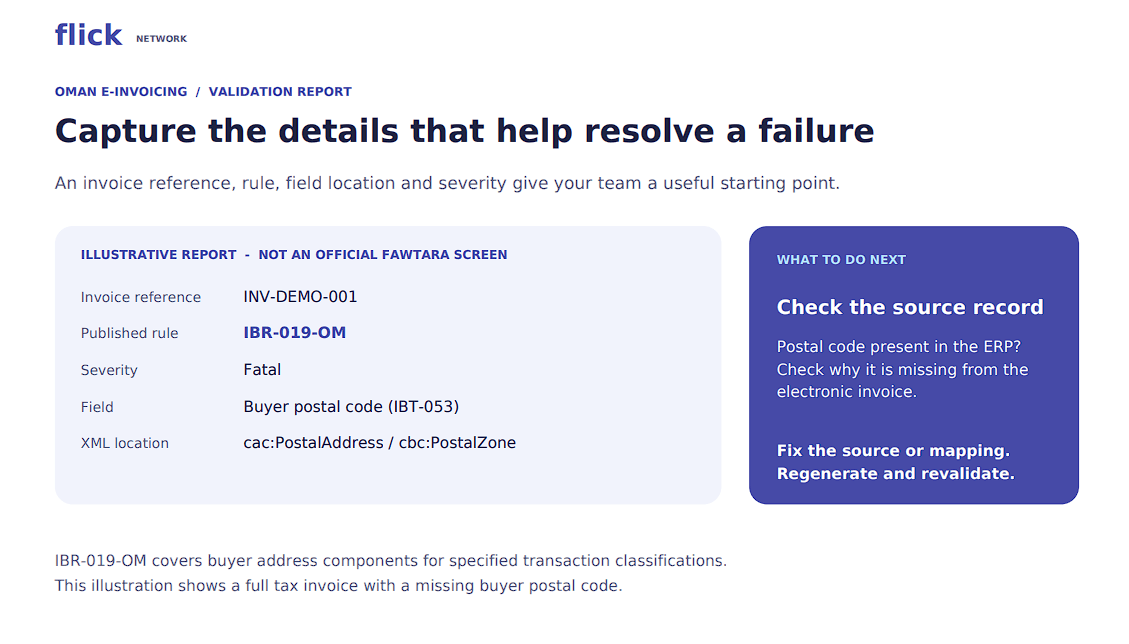
Capture the field and rule reference before asking finance, IT, or your provider to investigate.
Does a Warning Mean the Invoice Has Failed?
PINT OM Billing v1.0.1 describes accepted, accepted-with-warning and rejected outcomes for two VAT-amount checks associated with tax-inclusive rounding.
A difference within the specified tolerance can produce a warning; a difference beyond it fails the check. This applies to identified VAT fields, not all totals or missing data. Review warnings separately from fatal failures and confirm the calculation.
To prevent repeated Oman e invoicing validation errors, test the invoice scenarios your business uses, including discounts, mixed VAT categories, foreign currencies and relevant export or period-based billing. Record the cause and correction of each failure.
Flick Network provides e-invoicing and integration tools. Its Oman e-invoicing solution supports ERP integration, invoice validation and tax reporting. Bring real invoice scenarios to the setup discussion so the checks reflect your billing needs.
Frequently Asked Questions
Q1. Why Does My Invoice Fail Validation When the PDF Looks Correct?
A required value may appear on the PDF but be missing or incorrectly mapped in the XML. Compare the electronic field with the ERP record and validation message.
Q2. Who Checks Oman E Invoicing Validation Errors?
Service providers validate invoices against Oman’s Schematron rules. The taxpayer remains responsible for compliance, including correct transaction information and VAT treatment.
Q3. Does Every Buyer Need an Oman VAT Number?
Requirements depend on the transaction. Specified classifications, including full tax and export invoices, allow either a buyer identifier or buyer VATIN. Other scenarios have separate requirements.
Q4. Can I Add an Exchange Rate of 1 to Every Invoice?
No. An OMR invoice must omit the exchange rate and separate tax accounting currency. Foreign-currency invoices require the applicable conversion information and OMR tax amounts.
Q5. Can I Use a Rounding Amount to Clear a VAT Error?
A payment-rounding adjustment does not establish that VAT is correct. The specified VAT-tolerance checks operate independently of that field. Check the VAT calculation and rounding step first.
Q6. Does Passing Validation Confirm Delivery and Tax Reporting?
It confirms that the document cleared the checks performed. Review customer delivery and TDD reporting separately, and still verify the transaction’s VAT treatment.
Quick Navigation
Book a Demo
Learn more by booking a demo with our team. We'll guide you step by step.