Foreign Currency Invoices in Oman: VAT Conversion & Rounding
Last updated at
October 10, 2026
Book a Demo
Learn more about this by booking a demo call with us. Our team will guide you through the process and answer any questions you may have.
Book NowForeign-Currency Invoices Under Oman E-Invoicing: VAT Conversion and Rounding
An Omani business can issue a tax invoice in a foreign currency, but it must also calculate the VAT in Omani rials. Under Oman’s published e-invoicing specification, the invoice currency, OMR tax amounts, and exchange-rate information need to agree.
For finance teams, the difficulty often comes when different systems handle those calculations differently. An ERP may keep detailed line amounts, an invoice template may display rounded totals, and an integration may shorten the exchange rate before converting VAT. Small differences can then appear between the customer’s invoice, the electronic document, and the accounting records.
Here, the first step is to separate the currency used to bill the customer from the currency used to account for VAT. After that, check the exchange-rate source, the relevant date, and the rounding rules for each field.
This guide explains foreign-currency invoices under Oman e-invoicing, identifies the main currency fields, and works through a USD invoice with VAT in OMR. It also covers the checks that help keep the calculations consistent.
Can an Oman Tax Invoice Be Issued in a Foreign Currency?
Yes. Article 68 of Oman’s VAT Law permits tax invoices in Omani rials or another currency. For a foreign-currency invoice, VAT must be calculated in OMR using the average buying and selling rate published by the Central Bank of Oman on the tax due date.
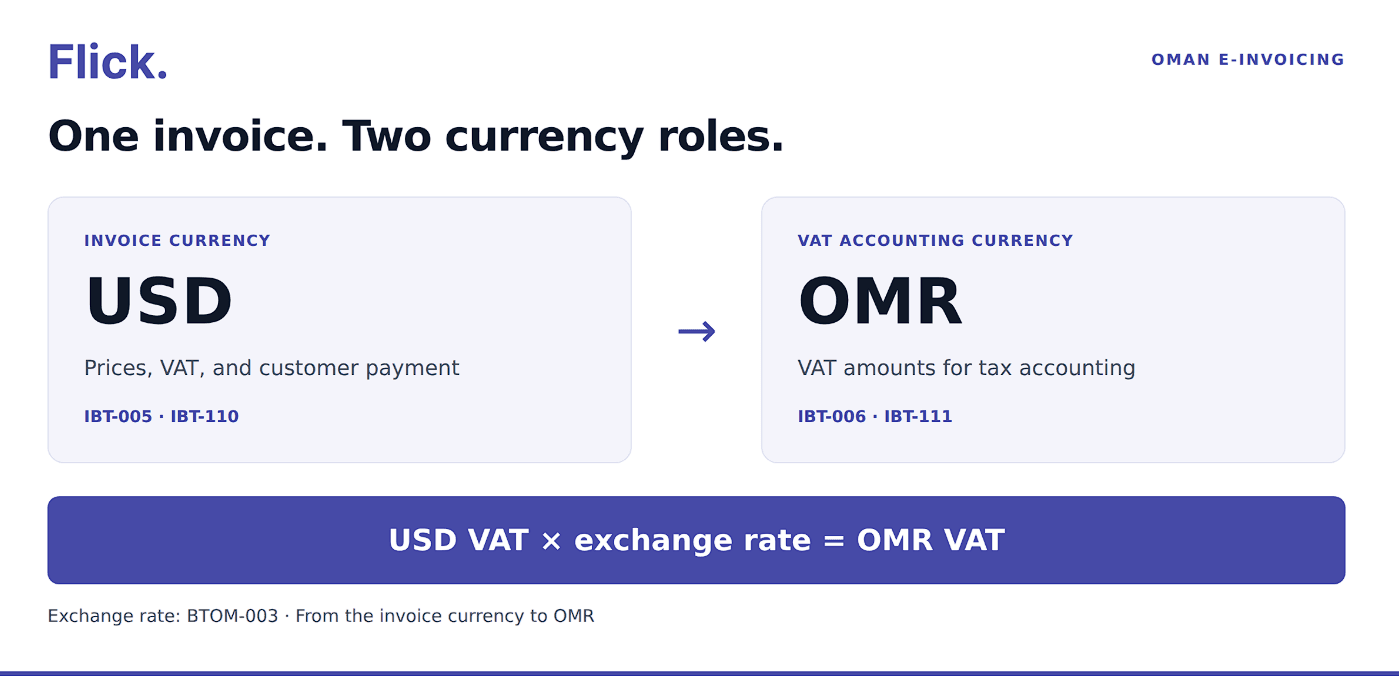
The invoice currency is the currency used for the commercial invoice amounts. For example, a USD invoice can show its prices, net total, VAT, and amount payable in USD.
The VAT accounting currency serves a different purpose: it identifies the currency used for the additional tax amounts. In Oman, that currency is OMR.
The PINT Oman currency model requires OMR tax-accounting information and an exchange rate when the invoice currency differs from OMR. When the invoice itself is in OMR, the separate tax-accounting currency and exchange rate must be omitted.
Converting VAT to OMR does not change the customer’s invoice currency. A USD amount payable remains a USD amount payable.
Which Exchange Rate Should You Use for VAT Conversion?
Start with the VAT rule before configuring the exchange-rate field. A rate can be correctly formatted in an electronic invoice while still coming from the wrong source or date.
Article 68 specifies the average of the Central Bank of Oman’s buying and selling rates at the tax due date. Check the relevant currency and quotation on the Central Bank of Oman’s exchange-rate page, and retain the figures used in your calculation.
For an ordinary supply, Article 26 generally makes tax due at the earliest of the supply, invoice issuance, or receipt of payment, with an advance payment affecting the amount received. Particular transactions can follow other tax-due rules. The conversion date therefore needs to follow the transaction’s VAT treatment.
A useful internal record includes the tax due date, published buying and selling rates, calculated average, and final rate entered into the invoice. This makes the conversion easier to check later.
Check the Direction and Precision of the Rate
Under PINT Oman’s exchange-rate direction rule, the source currency must match the invoice currency and the target currency must match the tax accounting currency.
For a USD invoice, the conversion therefore runs from USD to OMR. If the rate means 1 USD = 0.3845 OMR, multiply the USD VAT by 0.3845. A rate expressed as USD per OMR would need to be converted to the required direction first.
The exchange-rate precision rule allows a maximum of seven decimal places. This is a limit, rather than an instruction to shorten every rate to two or three decimals.
Keep enough precision for the calculation and check how the rate passes between systems. Rounding it early can affect the converted VAT, particularly on larger invoices.
What Currency Information Does the Electronic Invoice Need?
PINT Oman, the published invoice specification, uses separate fields for invoice amounts and tax-accounting amounts. Your finance team does not need to memorise the field codes, but they are useful when discussing the setup with an ERP or service provider.
| Information | PINT Oman field | What to check |
| Invoice currency | IBT-005 | The currency used for the invoice’s commercial amounts, such as USD. |
| Tax accounting currency | IBT-006 | OMR when the invoice currency differs from OMR. |
| Exchange rate | BTOM-003 | The rate from the invoice currency to OMR, with no more than seven decimal places. |
| Total VAT in invoice currency | IBT-110 | The invoice’s VAT total in its own currency. |
| Total VAT in tax accounting currency | IBT-111 | The VAT total converted to OMR. |
| Standard-rated tax-category information in OMR | IBT-190, IBT-192, and IBT-193 | The applicable accounting-currency category tax amount, category code, and rate. |
The VAT conversion rule requires the OMR VAT total to be derived from the invoice-currency VAT total multiplied by the exchange rate.
There is also an important conditional requirement. Under the accounting-currency tax-category rule, a foreign-currency invoice containing standard-rated VAT must provide the specified tax-category amount, code, and rate in the accounting-currency tax section. Adding one converted VAT total is not the entire requirement for that case.
Keep the currency labels consistent with the values. An OMR amount belongs in the accounting-currency fields; changing a currency label without converting the number would misstate the amount.
How Does Rounding Work Under PINT Oman?
Omani rials use baisa precision: OMR 0.001 equals one baisa. However, that does not mean every field in an electronic invoice accepts three decimal places.
The Oman amount-precision rule places a three-decimal limit on the amount fields within its defined scope. Separate rules apply to document totals. For example, the invoice VAT-total rule limits the invoice total VAT amount to two decimal places.
OTA’s published VAT guidance also describes rounding tax to the nearest baisa at line-item level after applying the quantity. This line calculation and the electronic document’s total-field restrictions need to be handled at their respective stages.
The practical approach is to keep the calculation value until the relevant rounding step, then format the result for its destination field. A single setting that rounds everything to three decimals can cause problems.
Keep Calculation Precision Separate from Display Precision
Consider this conversion:
USD 7.89 × 0.3845 = OMR 3.033705
The result rounds to OMR 3.034 at three decimal places and OMR 3.03 at two decimal places.
For the document-level VAT total in this example, use OMR 3.03 to meet the published two-decimal validation restriction. OMR 3.034 illustrates three-decimal rounding; it is not the value to enter in that total field.
These figures demonstrate why the destination field matters. They are not interchangeable instructions for every OMR field. Check the applicable field rule before deciding which value to write into the electronic document.
Also check the actual text sent by the integration. A field with a two-decimal restriction should not receive a value formatted with extra decimal places merely because the invoice template normally displays OMR that way.
Use Rounding Adjustments for Their Intended Purpose
PINT includes an optional rounding amount, IBT-114, for rounding the amount payable. Keep any use of it traceable to a genuine adjustment in the payment calculation. It should not be used to conceal an incorrect exchange rate or VAT amount.
The PINT Oman release notes separately describe limited VAT rounding tolerance for tax-inclusive retail calculations. Those checks can accept a difference within the specified tolerance with a warning.
This retail tolerance is separate from the foreign-currency conversion check. IBR-065-OM uses its own validation tolerance of 0.01 when comparing the converted VAT total with the exchange-rate calculation. That tolerance does not replace the requirement to calculate VAT correctly.
Worked Example: A USD Invoice with VAT in OMR
Assume an Omani supplier participating in Fawtara makes a standard-rated domestic sale. The parties agree to invoice in USD.
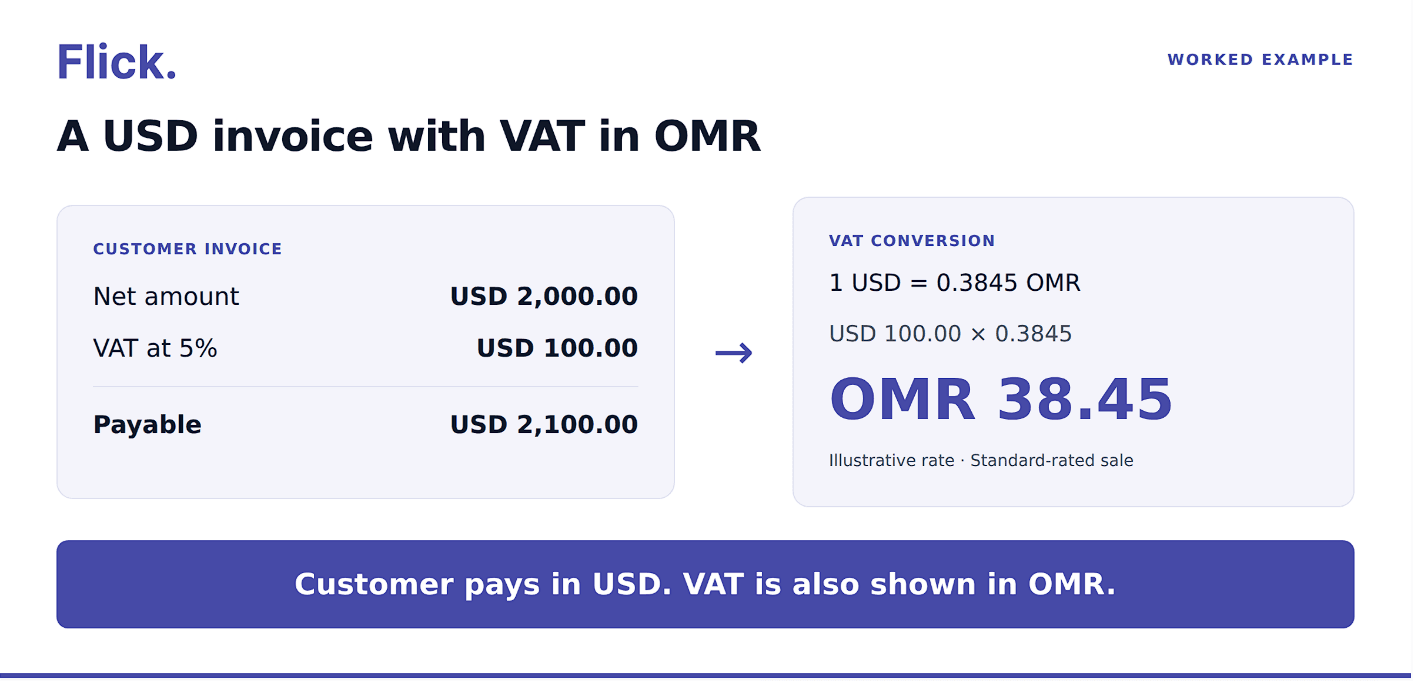
The net value is USD 2,000.00, and VAT applies at 5%. There are no discounts, additional charges, advance payments, or payment-rounding adjustments.
For this illustration, assume the applicable VAT conversion rate is:
1 USD = 0.3845 OMR
This is an illustrative rate, not a rate quoted for a particular transaction date.
The supplier first calculates the invoice in USD:
VAT: USD 2,000.00 × 5% = USD 100.00
Invoice total: USD 2,000.00 + USD 100.00 = USD 2,100.00
It then converts the VAT:
OMR VAT: USD 100.00 × 0.3845 = OMR 38.45
The corresponding conversions of the net value and gross total are shown below to make the arithmetic easy to check.
| Component | Invoice value in USD | OMR equivalent at 0.3845 |
| Net value | 2,000.00 | 769.00 |
| VAT at 5% | 100.00 | 38.45 |
| Total including VAT | 2,100.00 | 807.45 |
The totals agree: OMR 769.00 + OMR 38.45 = OMR 807.45.
In the electronic invoice, the invoice currency is USD, the tax accounting currency is OMR, and the exchange rate is 0.3845. The VAT total is USD 100.00 in the invoice currency and OMR 38.45 in the tax accounting currency.
Because this is a standard-rated foreign-currency invoice, the accounting-currency tax-category information also needs to be included. For this single-category example, its tax amount is OMR 38.45, with category S and rate 5.
The customer’s amount payable remains USD 2,100.00. The OMR net and gross equivalents in the table explain the conversion; they do not create a second amount payable or establish additional required fields by themselves.
This example deliberately produces exact totals. For transactions that produce rounding differences, retain the unrounded calculations and check the relevant line, category, and total fields separately.
Checks to Keep Foreign-Currency Invoice Totals Consistent
Review the invoice as a connected calculation. A correct exchange rate does not compensate for a missing discount, duplicated charge, or incorrectly grouped VAT amount.
In the invoice currency, confirm that the net total includes the applicable line amounts, document-level charges, and allowances. Check VAT by the relevant categories and rates, then verify the gross total and amount requested from the customer.
For OMR tax amounts, repeat the conversion check using the rate recorded in the invoice. If there are several tax categories, check the OMR breakdown as well as the total.
Before sending, use this checklist:
- Rate source and date: Confirm the applicable CBO rate and tax due date, and retain the calculation.
- Conversion direction: Confirm that the rate converts the invoice currency into OMR.
- Rate precision: Check that the integration preserves the required precision within the seven-decimal limit.
- Invoice totals: Reconcile lines, allowances, charges, VAT, and the customer’s amount payable.
- OMR tax information: Check the converted VAT total and any required accounting-currency category details.
- Rounding and formatting: Apply the relevant rules to each field, including the number of decimals actually transmitted.
- Document consistency: Compare the customer-facing invoice with the electronic data and the underlying accounting record.
- Validation results: Investigate errors and review warnings so any rounding difference has an explanation.
Test more than a straightforward single-line invoice. Include a multi-line transaction, a discount, a charge, mixed VAT categories, and a conversion that produces extra decimal places. These cases help reveal differences between systems before regular invoicing begins.
Flick Network provides e-invoicing and integration tools, and its Oman e-invoicing solution supports ERP integration, invoice validation, and OTA tax reporting. When reviewing your setup, bring examples of the currencies and calculations your business actually uses.
Frequently Asked Questions
Can I Issue an Oman E-Invoice in USD or EUR?
Yes. Oman’s VAT Law permits foreign-currency invoices. The electronic invoice also needs the applicable OMR tax information and exchange-rate details.
Should I Include an Exchange Rate on an OMR Invoice?
Under the published PINT Oman currency model, an invoice issued in OMR must omit the exchange rate and the separate tax-accounting currency.
Should Every OMR Amount Have Three Decimal Places?
No. One baisa is OMR 0.001, but electronic invoice fields have their own precision restrictions. Check the rules for line amounts and document totals separately.
Can I Use My ERP’s Default Exchange Rate?
Check its source, date, and direction first. A default rate should only be used for VAT conversion if it follows the applicable Oman requirements.
Does Invoicing in a Foreign Currency Change the VAT Rate?
The currency choice does not establish the VAT treatment. Determine the treatment of the supply first, then calculate and convert the applicable VAT.
Quick Navigation
Book a Demo
Learn more by booking a demo with our team. We'll guide you step by step.