Checking an XRechnung Before Sending: Validation Guide
Last updated at
October 19, 2026
Book a Demo
Learn more about this by booking a demo call with us. Our team will guide you through the process and answer any questions you may have.
Book NowChecking an XRechnung Before Sending: A Guide to Validation
A technically valid XRechnung can still contain an incorrect price, inaccurate transaction details or the wrong VAT treatment. Passing validation confirms that the invoice meets the checks applied by the selected configuration, but it does not establish that the invoice accurately reflects the underlying transaction.
The KoSIT Validator, used with its XRechnung configuration, checks structured invoice XML against applicable technical requirements and business rules. The German Federal Ministry of Finance (BMF) recommends validation during invoice creation and before sending to identify missing or illogical mandatory information. However, validation is not a prerequisite for tax recognition, including input VAT deduction.
This guide explains how to select a compatible validation configuration, interpret and resolve validation messages, and check invoice accuracy before sending.
What Does XRechnung Validation Check?
XRechnung validation checks structured invoice XML against the technical specifications and business rules applied by the selected configuration. The KoSIT Validator, used with its XRechnung configuration, checks the XML structure, required information and logical relationships between invoice fields against EN 16931 and German-specific requirements.
What Are the Main Types of Validation Checks?
| Check type | What it verifies | Example |
| XML syntax | Whether the file is well-formed XML. | A missing closing tag or malformed element can prevent the XML from being processed correctly. |
| Schema validation | Whether the XML follows the structure and element placement defined by the applicable schema. | An element appears in a position not permitted by the schema. |
| EN 16931 and XRechnung business rules | Whether mandatory information is present and relationships between invoice fields meet the applicable requirements. | A required field is missing, or the tax amount does not match the taxable amount and stated VAT rate. |
The XRechnung validation configuration supports structured invoice documents in UBL and UN/CEFACT Cross Industry Invoice (CII) syntax. The checks performed, messages returned and severity classifications depend on the selected configuration and its version. Use a configuration compatible with the specification used to generate the invoice, as different configurations may apply different checks.
The German Federal Ministry of Finance (BMF) recommends validating invoices during creation and before sending to identify missing or illogical mandatory information. However, validation is not a prerequisite for tax recognition, including input VAT deduction.
How to Validate an XRechnung Before Sending
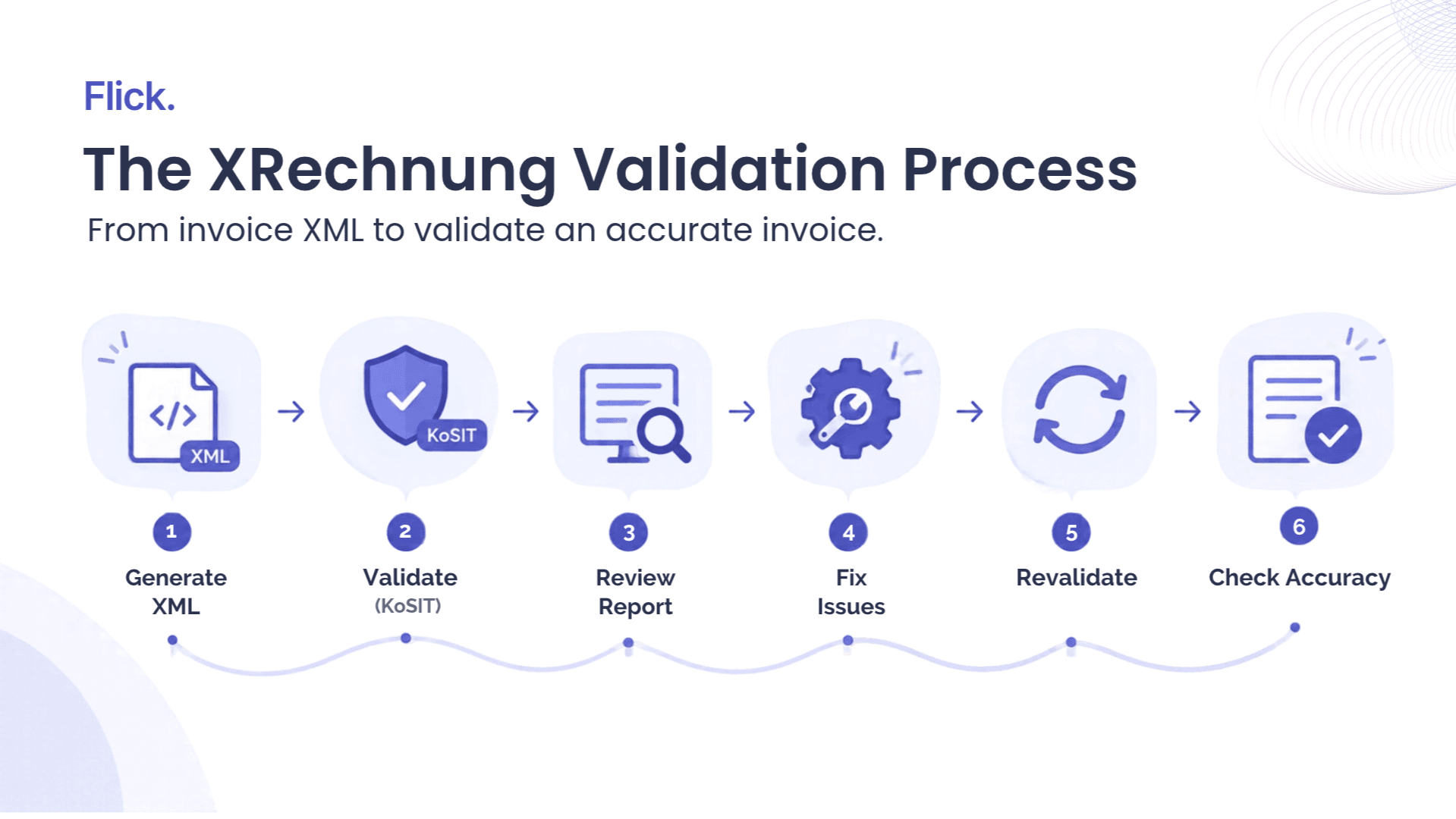
The validation process starts with the structured invoice XML generated by the ERP or billing system. You then run the file through a compatible validator, review the report, correct any issues and validate the corrected file again.
Step 1: Check the XRechnung Version and Validation Configuration
Identify the XRechnung specification and structured syntax used to generate the invoice. The selected validation configuration must support that specification and its applicable requirements.
XRechnung 3.0 remains the specification for production use and is expected to remain in force until at least 31 July 2027. The latest technical bundle is XRechnung Bundle 3.0.2, dated 31 August 2026, which includes a validator configuration using KoSIT Validator 1.6.3. A preliminary version of XRechnung 4.0 was published on 15 September 2026 but is not intended for production use. The final version and its technical components are expected in spring 2027.
The XRechnung release documentation lists available specification versions and technical bundles, helping businesses identify the components required for their validation setup.
Step 2: Run the Invoice Through the Validator
Use the structured XML generated by your ERP or billing system as the validation input. Run it through the KoSIT Validator with the intended XRechnung configuration, which determines the schema and business-rule checks applied. A basic XML syntax check alone is insufficient because a well-formed file can still violate EN 16931 or XRechnung requirements. The validator can generate reports in formats such as XML and HTML, with the available details depending on the execution setup and selected configuration.
Step 3: Review the Validation Report
Review the validation report rather than relying only on a pass or fail indicator. The report helps identify which checks produced messages and where further investigation may be necessary.
Focus on the following information:
- Overall result: Whether the invoice passed the checks applied by the selected configuration.
- Validation messages: Errors, warnings and other messages generated during validation.
- Affected invoice data: The relevant business term, field or XML location, where the report provides it.
- Required action: Whether the issue needs correction or further investigation.
The severity and meaning of each message depend on the applicable rule and validation setup. A warning does not automatically mean an invoice must be rejected, and a successful result does not guarantee acceptance by the recipient. Next, resolve the issues identified in the report and check the corrected invoice again.
How to Fix XRechnung Validation Errors and Warnings
The corrective action depends on the issue reported. Structural errors may require changes to the XML-generation process, while missing or inconsistent information requires corrections to the source data. Where possible, correct the underlying data or XML-generation process instead of editing individual invoice files manually.
After making the correction, regenerate the XML where necessary and validate it again using a compatible configuration. Review warnings and informational messages against the applicable validation requirements before deciding whether further action is needed. Passing validation does not guarantee successful transmission or recipient acceptance, as separate routing and submission requirements may still apply.
| Issue category | Corrective action |
| XML syntax or schema error | Correct the document structure or resolve the XML-generation problem, then regenerate the file. |
| Missing or invalid information | Supply the required value or correct the field's format. |
| Inconsistent values | Check the source records and correct the affected data or calculations. |
| XRechnung-specific rule violation | Review the applicable requirement and correct the underlying data or document structure. |
| Warning or informational message | Assess the message against the applicable rule and recipient requirements to determine whether corrective action is needed. |
Why Can a Technically Valid XRechnung Still Be Wrong?
A validator checks an invoice against defined technical requirements and business rules. It does not independently compare invoice details with the contract, purchase order, delivery records or other evidence of the underlying transaction. An invoice can therefore pass technical validation while containing commercially incorrect information.
Consider a company that agrees to provide a service for €8,000 before VAT, but its billing system generates an invoice for €10,000 before VAT. Assume the service is subject to Germany's 19% standard VAT rate. The generated invoice calculates VAT correctly on its stated price, but the net amount exceeds the agreed price by €2,000.
If all other applicable checks are satisfied, the invoice may pass validation despite the incorrect price. Incorrect quantities, service periods or purchase-order references may also go undetected when they meet the validation rules but differ from the actual transaction. A mathematically consistent VAT calculation does not necessarily mean the tax treatment is correct. Businesses must therefore compare invoice data with source records and check the applicable e-invoicing requirements in Germany.
| Invoice detail | Agreed transaction | Generated invoice |
| Net service price | €8,000 | €10,000 |
| VAT rate | 19% | 19% |
| VAT amount | €1,520 | €1,900 |
| Gross amount | €9,520 | €11,900 |
What Should Businesses Check Beyond Technical Validation?
Technical validation should form part of a broader invoice-control process. Businesses must also check whether the invoice reflects the transaction and whether its tax treatment and required information are correct.
Check Commercial Accuracy Against Source Records
Contracts, purchase orders and delivery records provide the reference points for checking whether an invoice reflects the agreed transaction. Before sending, verify that:
- Customer and supplier details match the transaction records.
- Quantities, unit prices and totals match the agreed amounts.
- The service description and service period reflect the goods or services provided.
- The invoice date and purchase-order references are correct.
- The generated invoice matches the data held in the ERP or billing system.
Where discrepancies are found, trace them to the relevant contract, purchase order, delivery record or source-system entry. Correct the underlying data and regenerate the invoice where necessary.
Review VAT Treatment and Required Invoice Information
Check that the VAT rate, exemption or other tax treatment is appropriate for the transaction. Reconcile the taxable amount and VAT amount with the transaction records, and verify the required invoice information against the applicable legal requirements. Section 14 of the German VAT Act (UStG) sets out requirements for invoice issuance and content. The applicable requirements depend on the transaction and its circumstances.
If the invoice involves an exemption, a special VAT treatment or a cross-border transaction, confirm the applicable treatment before sending. Correct any discrepancies in the tax code, taxable amount or VAT calculation in the source system, then regenerate and revalidate the invoice.
Build Checks Into the Invoice Process
Businesses can reduce recurring errors by incorporating suitable checks into invoice creation and review processes. Automated controls can identify missing fields, inconsistent calculations and discrepancies with source records where the systems support those checks. Automation can reduce repetitive checks by reconciling invoice data with ERP, purchase-order and contract records. However, review procedures should reflect the business’s systems, transaction types and risks. Exceptions requiring commercial context or tax judgement, as well as information that cannot be verified from the invoice file alone, still need investigation.
How to Test Your XRechnung Process With Official Sample Files
The official XRechnung test suite contains example invoices and reference messages for defined business and technical test cases in UBL and CII. These samples help businesses understand the specification and verify whether their validation setup handles different invoice scenarios as expected. Follow these steps to test your XRechnung setup:
- Select a relevant test case. Choose an official sample that matches the invoice syntax, business scenario or technical requirement you want to test. Select cases that reflect the requirements relevant to your invoicing process.
- Review the expected result. Read the official documentation to understand what the test case checks and which validation outcome is expected. This gives you a reference for assessing whether your setup behaves as intended.
- Run the sample through your validation setup. Submit the sample invoice to a validator using a configuration compatible with the applicable XRechnung specification and structured syntax. Ensure the configuration applies the relevant schema and business-rule checks.
- Compare the actual and expected results. Review the validation report against the documented expectation. If the results differ, investigate whether the cause lies in the validator configuration, the selected specification or the way your system processes the invoice.
Test Production Readiness Separately
Passing official sample tests shows that your setup handles the selected test cases as expected, but it does not establish that the complete invoicing process is ready for production. Test representative invoices generated by your ERP or billing system, including scenarios likely to trigger validation errors. Also verify that invoice details match source records and that the process meets applicable submission requirements before going live.
Conclusion
XRechnung validation helps identify structural errors, missing required information and violations of applicable business rules before an invoice is sent. The process involves selecting a compatible configuration, reviewing the validation report and correcting any reported issues.
However, passing validation does not confirm that the invoice reflects the agreed transaction or applies the correct VAT treatment. Businesses must also verify invoice data against source records and meet the wider requirements for e-invoicing in Germany, including applicable invoicing and VAT obligations.
Frequently Asked Questions
Is XRechnung validation mandatory in Germany?
No. The BMF recommends validation, but it is not a prerequisite for tax recognition. Applicable invoice and submission requirements still apply.
What does a KoSIT validation report show?
It shows the validation result and messages, including errors, warnings and affected invoice data where available.
Does successful XRechnung validation mean an invoice is tax-compliant?
No. Validation checks defined technical and business rules but does not verify the transaction or VAT treatment.
Can a PDF be validated as an XRechnung?
No. A standard PDF is not XRechnung XML. ZUGFeRD contains structured invoice data that can be validated separately.
Can an XRechnung be rejected after passing validation?
Yes. Incorrect routing, recipient-specific requirements or processing issues can still prevent acceptance. Monitor the submission status.
Quick Navigation
Book a Demo
Learn more by booking a demo with our team. We'll guide you step by step.